You Don’t Need 200 Cloud Services - Just These 10 (AWS & GCP)
Stop memorising services. Learn the primitives instead

The first post of 2026, welcome back to the newsletter. If you are in DevOps, DevSecOps, SRE or working as a cloud architect, this issue is for you.
Before joining Google, I mainly worked on and learned AWS. When I first started learning cloud platforms, it felt like a wall of icons, marketing pages and certifications. In real workloads, whether on AWS or GCP, it always came back to a small set of building blocks that actually carry most of the weight.
In this post, I am going to break things down using both AWS and GCP references, in plain English, the way I wish someone had done for me when I was knee deep in debugging production issues and trying to design reliable systems.
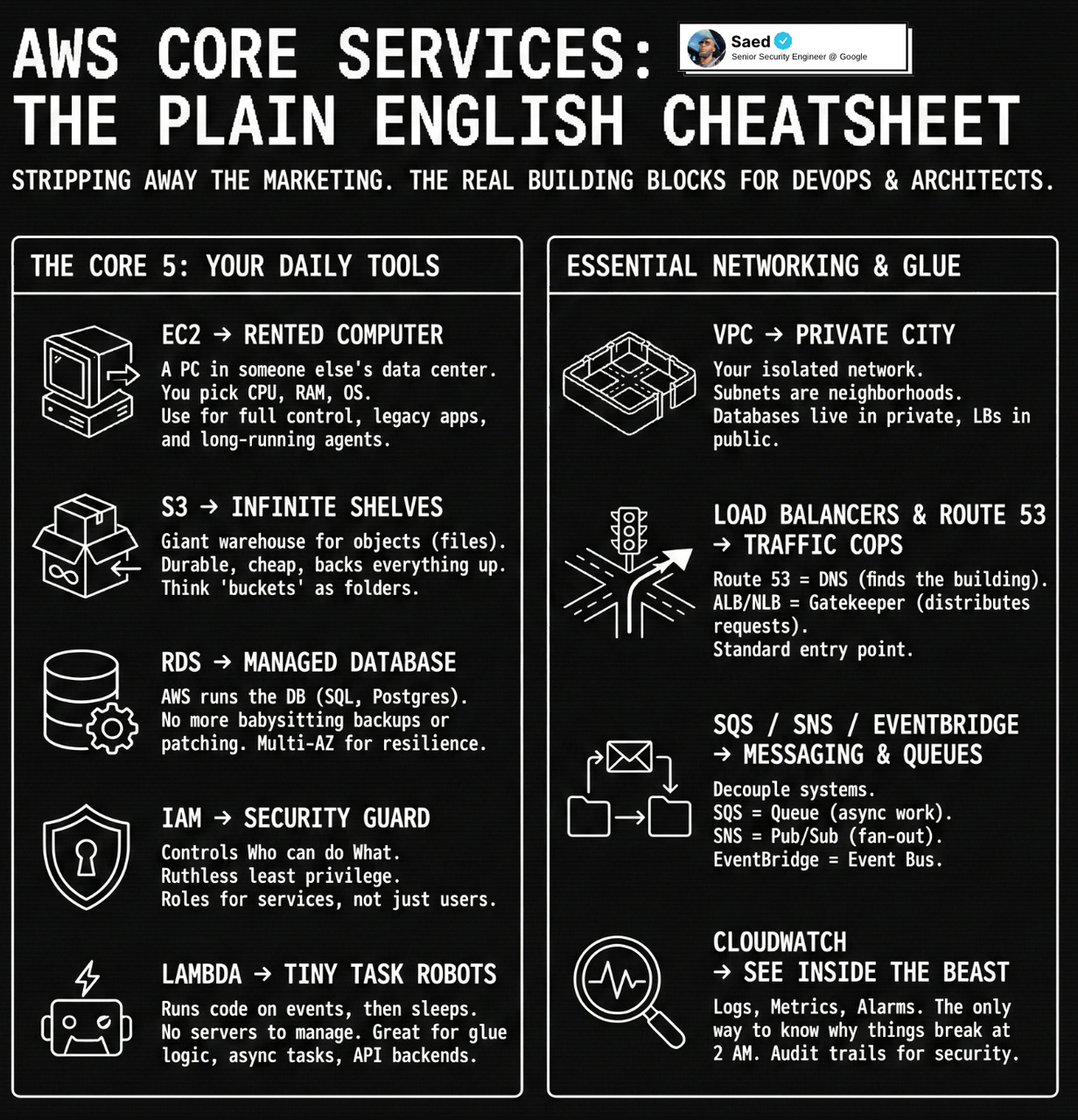
We will focus on the core pieces you touch every day, how they fit together for real architectures, and how to talk about them clearly in design reviews and interviews in 2026.
AWS names are listed first, GCP names second, the arrow represents the shared problem both services solve, regardless of cloud.
At the simplest level
- EC2 / Compute Engine → computer
- S3 / Cloud Storage → storage
- RDS / Cloud SQL → database
- IAM / IAM → security guard
- Lambda / Cloud Functions → automation
That alone covers a scary amount of what you will touch in real workloads. Let’s go deeper and make this actually useful for design, work and interviews.
1. EC2 / Compute Engine → Your rented computer in the cloud
Think of EC2 or Compute Engine as a computer in someone else’s data center that you rent by the hour.
You choose
- How big it is CPU, RAM, network
- What it runs Linux, Windows, custom images or AMIs
- How you treat it pets or cattle
You use EC2 or Compute Engine when
- You need full control over the OS and runtime
- You are running workloads that are not easily containerised yet
- You want to run agents security tools, log collectors, self hosted services
What to actually know
- EC2 + Auto Scaling Groups + ALB or Compute Engine + Managed Instance Groups + Load Balancer is the basic pattern for web services
- Use security groups (AWS) or firewall rules (GCP) as the first line of network protection
- Use EBS (AWS) or Persistent Disks (GCP) as the disk attached to the instance
- Stop thinking of machines as permanent. Instances will die. Design for that.
If someone says “our backend is on the cloud” often it is just “some VMs behind a load balancer inside a VPC”.
2. S3 / Cloud Storage → Infinite storage room with shelves
S3 and Cloud Storage are like giant warehouses with infinite shelves where you throw files called objects.
You use them when
- You need to store logs, images, backups, builds, datasets
- You want cheap, durable, almost infinite storage
- You want static website hosting or a place to keep artifacts
Important mental model
- You put stuff in buckets
- Each bucket is like a top level folder
- Inside you have objects, identified by keys or names basically paths
Why this storage layer is such a big deal
- It is insanely durable
- It is the backbone for backups, data lakes, ML pipelines, log archives
- Almost every other cloud service knows how to read and write to it
What matters in real work
- Lifecycle rules Glacier on AWS, Nearline or Coldline on GCP
- Permissions bucket policies and IAM are where many breaches start
- Static content frontends, assets, static sites live very nicely here
If you understand EC2/Compute Engine and S3/Cloud Storage well, you already understand a lot of cloud architectures.
3. RDS / Cloud SQL → Managed database so you stop babysitting
RDS and Cloud SQL are both “let the cloud provider run your database for you”.
You pick
- Engine MySQL, Postgres, SQL Server, etc
- Size instance class or machine type, storage
- Extras multi AZ or high availability, read replicas, backups
You use them when
- You want a relational database but do not want to manage patching, backups, failovers
- You are building a typical web or microservice stack that expects a SQL database
Things that actually matter
- Multi AZ / HA is not performance, it is resilience
- Read replicas help scale reads, not writes
- Backups and retention periods save your job when someone drops a table
- Network placement and private IPs decide if your DB is exposed or private
For interviews, “web app behind a load balancer with compute and a managed SQL database in private networks” is the stock answer for a huge number of system design questions.
4. IAM → Ruthless security guard at every door
IAM exists in both AWS and GCP and plays the same role.
You define
- Identities users, roles, service accounts
- Policies what can do what on which resources
You use IAM when
- A service needs to call another service
- A human needs access through console or CLI
- You want least privilege access which you should
Core ideas
- Never hardcode credentials in code. Use IAM roles (AWS) or service accounts (GCP).
- Think in terms of “this role or service account can read from this bucket”.
- IAM is how you limit blast radius when something goes wrong.
If you are lazy with IAM, you are basically handing your production keys to anyone who gets in once.
5. Lambda / Cloud Functions → Little robots that run when events happen
Lambda and Cloud Functions are tiny robots that wake up, do one task, and go back to sleep.
You use them when
- You want to run code without managing servers
- You want to respond to events S3 or Cloud Storage uploads, HTTP calls, Pub/Sub or SQS messages
- You need glue logic between services
Great uses
- Resize an image when it is uploaded
- Process logs and push metrics
- Run scheduled cleanups or audits
- Build simple backend APIs
What to actually remember
- You pay for execution time, not idle
- Cold starts are a thing
- Use environment variables and IAM, not hardcoded secrets
In modern stacks, serverless plus object storage can replace a lot of traditional “small VM boxes”.
6. VPC and networking → The city your services live inside
VPC exists in both AWS and GCP.
Inside a VPC you have
- Subnets
- Routing
- Internet access
- NAT for private egress
You use VPC when
- You want isolation from the internet
- You are deploying anything serious
Key habits
- Put databases in private networks
- Control traffic tightly between services
- Expose only load balancers publicly
If you get VPC mental models wrong, everything else feels confusing.
7. Load balancers and DNS → Traffic cops
Think of it like this
- Route 53 / Cloud DNS tells users where to go
- ALB/NLB or GCP Load Balancer decides which backend handles the request
This is a very standard high level flow in interviews and real systems.
8. SQS/SNS/EventBridge and Pub/Sub/Cloud Tasks/Eventarc → Messaging
Queues and events help you decouple systems.
You use them when
- You want async processing
- You want retries and back pressure
- You do not want users waiting on slow work
9. Monitoring and logging → How you see inside the beast
- CloudWatch and CloudTrail on AWS
- Cloud Monitoring, Logging and Audit Logs on GCP
If you ignore this, you are flying blind.
10. How to think about cloud in interviews and real work
Think in layers
- Entry
- Compute
- Storage
- Network
- Identity
- Observability
- Async processing
If you get comfortable with these core primitives on either AWS or GCP, you are already operating at a very strong practical level.
Everything else is mostly specialisation.
If there is one thing I want you to take into 2026 from this post, it is this. You do not need to know every shiny service. You need clean mental models for a few core primitives, and the ability to reason about reliability, security and cost when you put them together.
If this helped, share it with one person who is trying to grow into stronger cloud or DevSecOps roles this year.
Follow me on Instagram for video form content!